

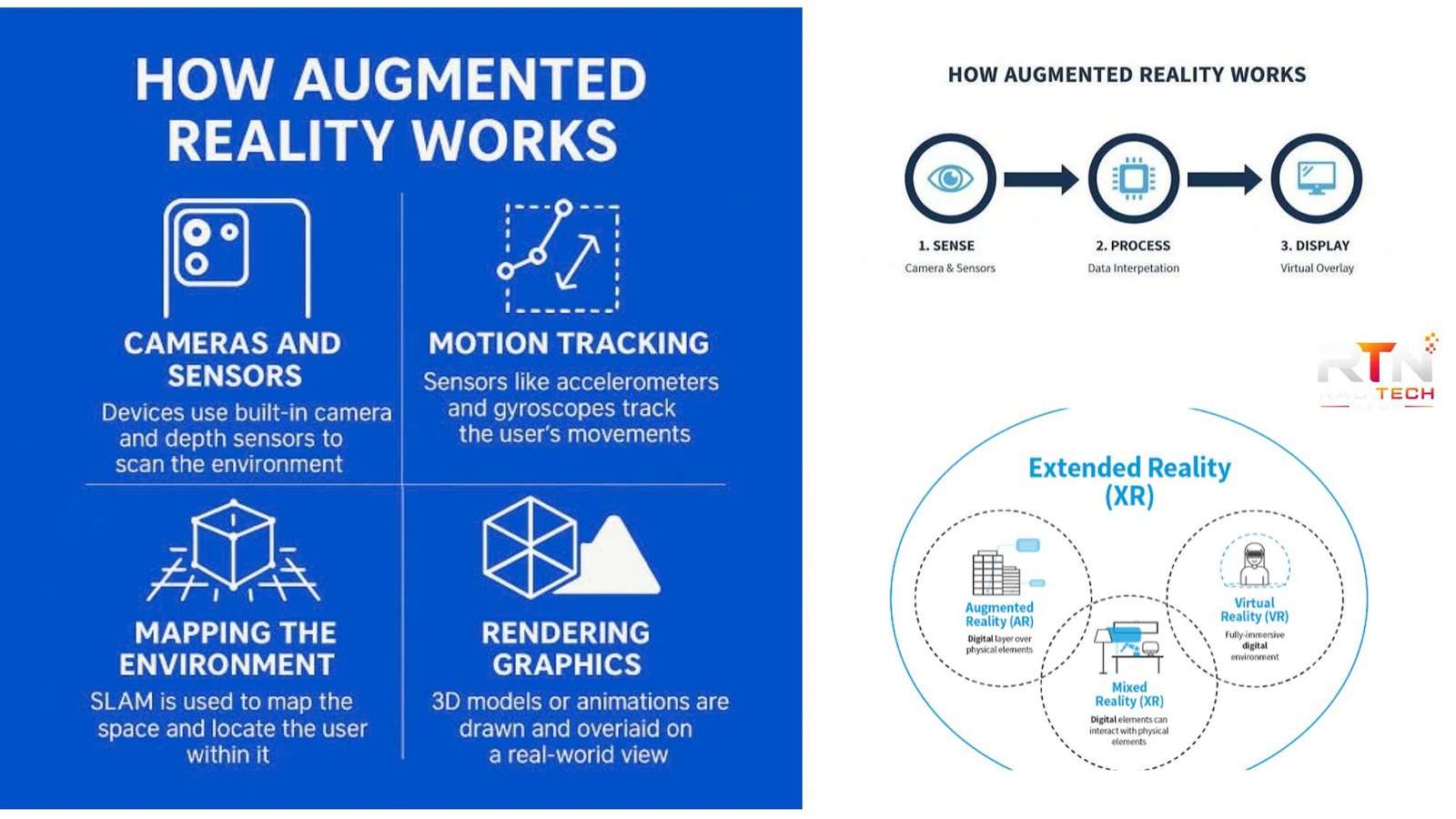
How does augmented reality work? At its core, AR combines a live view of the physical world with computer-generated information. A smartphone, tablet, smart glasses, or headset uses cameras and sensors to understand its surroundings, while software determines where digital objects should appear. The system then renders those objects from the correct position and perspective so they appear connected to the real environment. Google for Developers+1
That process happens continuously, often many times per second. The result can be as simple as a virtual piece of furniture placed on a living-room floor or as sophisticated as interactive 3D information displayed through specialized glasses.
How Does Augmented Reality Work?
AR generally follows a continuous cycle: capture, understand, track, render, and display.
The camera captures images of the surrounding environment. Motion sensors such as accelerometers and gyroscopes provide information about how the device is moving. AR software combines these inputs to estimate the device’s position and orientation. Google for Developers+1
Computer vision then analyzes visual information to identify useful features, surfaces, images, or objects. Depending on the application, the software may detect a floor, wall, poster, face, or other recognizable element.
Once the environment is understood, the system establishes a reference point, often called an anchor. Digital content can then be attached to that position. As the user moves the device, the software continuously updates the virtual object’s position so it stays aligned with the physical environment.
Finally, the graphics engine renders the digital content and combines it with the camera view or sends it to a see-through display. Correct perspective and low latency are critical because noticeable delays can make virtual objects appear disconnected from the real world. Google for Developers+1
The main technologies behind AR
| Technology | What it does | Example |
|---|---|---|
| Camera | Captures the physical environment | Phone camera |
| Motion sensors | Detect movement and orientation | Gyroscope, accelerometer |
| Computer vision | Recognizes visual features and surfaces | Floor detection |
| Depth sensing | Estimates distance and scene geometry | Depth camera |
| Spatial tracking | Keeps digital objects positioned correctly | Virtual chair on a floor |
| Rendering | Generates the digital graphics | 3D model |
| Display | Shows the combined experience | Smartphone or AR glasses |
Step by Step: What Happens Inside an AR Experience?
Understanding the individual stages makes the technology easier to visualize.
1. The device observes the environment.
The camera collects a stream of images while motion sensors measure changes in movement. Some devices also provide depth information. ARCore, for example, uses cameras and device sensors to help applications interpret the surrounding environment. Google for Developers
2. Software searches for useful visual information.
Computer vision algorithms examine camera frames for distinctive features. These may help the system recognize surfaces, images, faces, or other trackable elements.
3. The device estimates its position.
The system compares information across successive frames and combines it with motion-sensor data. This allows the software to estimate how the device has moved through space.
4. Digital content is anchored.
Suppose an AR furniture app identifies a floor. When you place a virtual sofa, the application creates a spatial relationship between the sofa and the detected environment. Moving your phone should not cause the sofa to float randomly across the room.
5. The scene is rendered.
The graphics engine calculates how the virtual object should look from the device’s current viewpoint. This includes position, scale, orientation, and perspective.
6. The result appears on the display.
The rendered graphics are presented together with the user’s view of the physical world. The process repeats as the user moves, allowing the digital content to remain spatially registered.
💡 Pro Tip: When an AR app asks you to move your phone slowly around a room, do it. That movement gives the tracking system more visual information about surfaces and features, helping it establish a more accurate spatial understanding before you place virtual objects. Google for Developers+1
How AR Recognizes Objects and Surfaces
There are several approaches to environmental understanding.
Marker-based AR uses a known image or visual marker as a reference. For example, an application can recognize a particular poster and display a 3D animation over it. Google’s ARCore can detect reference images by extracting distinctive visual features and matching them against an image database. Google for Developers
Markerless AR does not require a specific printed target. Instead, the system uses cameras, sensors, computer vision, and sometimes depth information to understand surfaces and movement. This approach makes experiences such as placing virtual furniture in an unfamiliar room possible. IBM
Depth information can add another layer of realism. AR systems can use depth maps to determine whether a virtual object should appear in front of or behind parts of the physical environment. Google for Developers
Where Is Augmented Reality Used?
AR is no longer limited to demonstrations or games. Its ability to connect digital information with physical surroundings makes it useful across several fields.
- Retail: Shoppers can preview products or furniture in their own spaces.
- Education: Students can interact with 3D representations of objects and scientific concepts.
- Manufacturing: Workers can receive visual instructions while working with equipment.
- Navigation: Directional information can be displayed in relation to the user’s surroundings.
- Entertainment: Games can place digital characters and objects into physical locations.
- Maintenance and training: Technicians can view contextual information while examining real equipment.
These applications differ considerably, but they rely on the same basic idea: the computer needs enough information about the physical environment to position digital content meaningfully.
What Are the Limitations of AR?
AR depends heavily on the quality of its sensors, cameras, processing hardware, software, and surrounding conditions. Poor lighting, rapid movement, reflective surfaces, limited texture, or an obstructed camera view can make tracking more difficult.
Processing speed also matters. If the system takes too long to update an object’s position after the user moves, the virtual content can appear to lag behind the real environment. Researchers have identified latency and spatial registration as important factors in maintaining a convincing AR experience. Microsoft
Not every device supports every AR capability either. Features such as advanced depth sensing or sophisticated tracking depend on the hardware and the particular AR platform. Google for Developers
📌 Key Takeaway: AR works by continuously connecting digital content to information about the physical world. Cameras and sensors collect data, computer vision interprets it, tracking determines position, and rendering places digital elements into the user’s view.
Frequently Asked Questions
Does augmented reality require special glasses?
No. Many AR experiences work on ordinary smartphones and tablets using their cameras, motion sensors, processors, and displays. Dedicated smart glasses can provide a more hands-free experience, but they are not required for basic AR applications. The hardware needed depends on the type of experience and the level of spatial understanding required.
What is the difference between AR and VR?
AR adds digital content to the physical environment, allowing users to continue seeing the real world. Virtual reality, by contrast, generally uses an immersive display to replace the user’s view with a computer-generated environment. Mixed reality can combine physical and digital elements with more advanced spatial interaction. Microsoft Learn
Does AR use artificial intelligence?
Some AR applications use AI or machine-learning models for tasks such as object recognition, image analysis, segmentation, or understanding people and environments. However, AR itself does not require AI for every function. Core AR capabilities can also rely on computer vision, sensor fusion, tracking, spatial mapping, and graphics rendering.
Can augmented reality work without GPS?
Yes. Many AR experiences can operate without GPS because they use cameras and motion sensors to track the device relative to its surroundings. For example, image detection and local surface tracking can establish an AR scene without determining the user’s global geographic location. Some applications do use GPS when location-based AR is required.
Why do AR objects sometimes move or disappear?
Tracking can become less reliable when the camera has insufficient visual information, the environment changes, lighting is poor, or the device moves too quickly. If the system loses its spatial reference, a virtual object may shift, wobble, or disappear until tracking is restored.
AR works because several technologies cooperate rather than because of one single component. Cameras observe the environment, sensors measure movement, computer vision interprets what the device sees, and graphics systems generate content from the appropriate viewpoint. That combination explains how does augmented reality work in practical applications: digital information is continuously calculated and positioned in relation to the physical world.
