
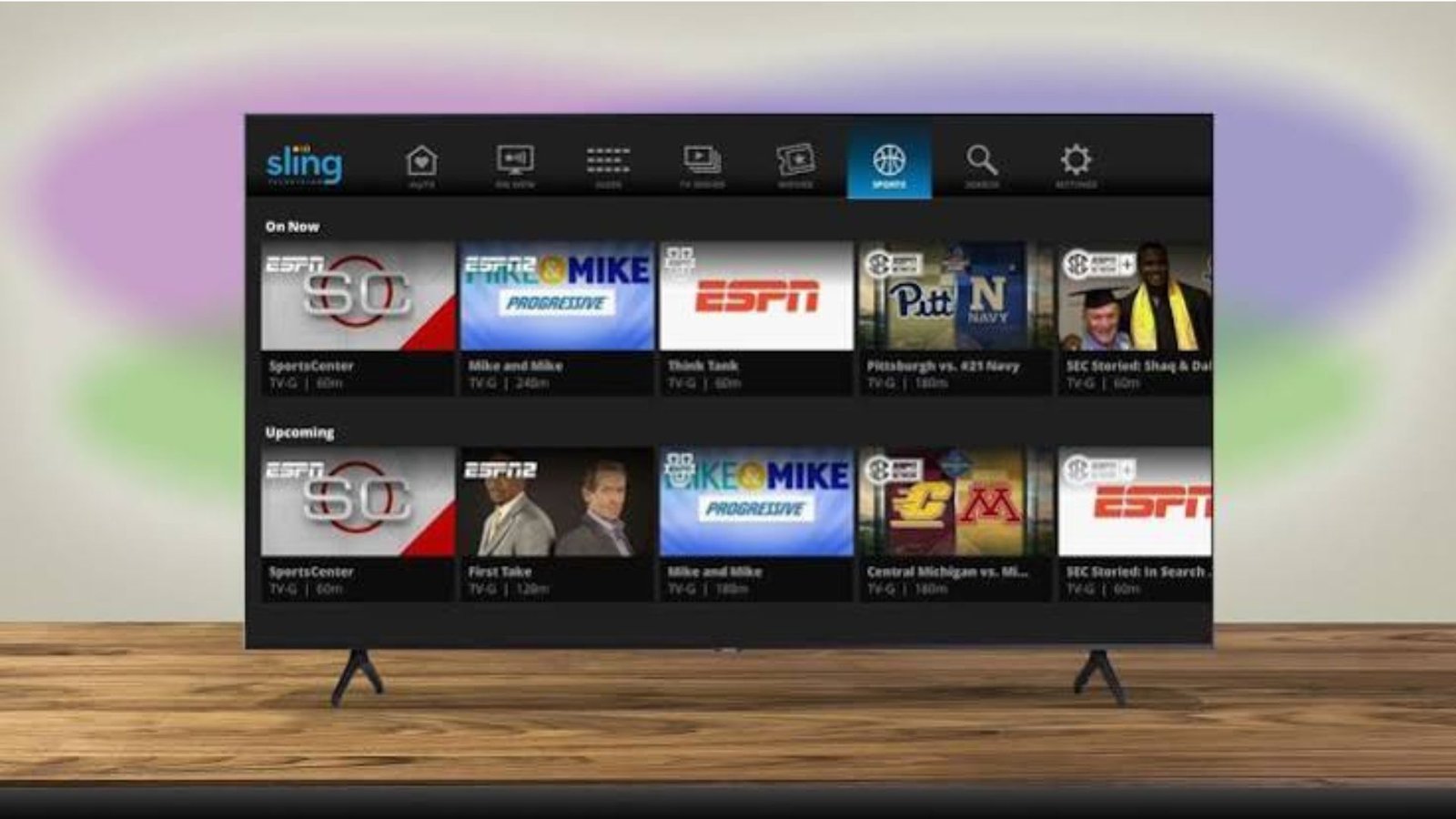
If you want live television without an expensive cable contract, choosing the right streaming service can feel confusing. You need the right channels, affordable monthly pricing, reliable streaming, and devices that work with your home setup. Sling TV offers a flexible alternative with customizable channel packages, live sports, entertainment, news, and free streaming options. This guide explains how the service works, what it costs, which devices support it, and whether viewers outside the United States can use it.
1. What Is Sling TV and How Does It Work?
Sling TV is an internet-based television streaming service owned by Dish Network. It allows subscribers to watch live television channels, sports, news, entertainment, and selected on-demand programs without a traditional cable or satellite television package.
Instead of paying for one large television bundle, customers can select a package that matches their viewing interests. They can also add extra channel collections and premium entertainment options.
The service works through an internet connection and a compatible streaming device. Users can watch television on smart TVs, computers, smartphones, tablets, and supported streaming players.
How Does the Service Work?
Getting started is straightforward:
- Create an account using an email address.
- Choose a subscription package.
- Select optional channel add-ons if needed.
- Download the application or open a supported web browser.
- Sign in and start watching available programs.
Unlike traditional cable television, subscribers do not need a technician to install a cable connection or satellite dish.
2. Sling TV Plans and Subscription Options
One of the biggest advantages of this streaming platform is its selection of subscription options. Different packages target sports fans, entertainment viewers, news audiences, and households that want a combination of channels.
The official plan comparison currently lists the following starting prices for November 2026.
Complete Plan Comparison Table
| Subscription plan | Starting monthly price | Paid channels | Simultaneous streams |
|---|---|---|---|
| Essentials | $19.99 | 10+ | 1 |
| Select | From $19.99 | 10+ | 3 |
| Essentials & Select | From $34.99 | 15+ | Up to 4 |
| Orange | From $45.99 | 30+ | 1 |
| Blue | From $45.99 | 40+ | 3 |
| Orange & Blue | From $60.99 | 50+ | Up to 4 |
Prices are advertised starting rates in USD. Promotional offers, package availability, taxes, and additional subscriptions can affect the final bill. Check the current checkout price before purchasing. Sling TV+1
Which Subscription Should You Choose?
- Essentials: Suitable for viewers who want a lower-cost package with ESPN and selected entertainment.
- Select: A choice for people interested in FOX News and other included programming.
- Essentials & Select: Combines selected channels from both entry-level packages.
- Orange: Focuses on sports and family entertainment.
- Blue: Offers a larger selection of news and entertainment channels.
- Orange & Blue: Combines both major channel collections for a broader viewing experience.
Before subscribing, compare the channel lists and simultaneous streaming limits. A cheaper package may not include the particular sports network or local station you need.
3. Sling TV Price and Possible Price Increases
Understanding the subscription cost is important before choosing a streaming provider. The advertised Sling TV price depends on the selected package, promotional discounts, and optional extras.
The starting prices range from $19.99 to $60.99 per month across the listed packages. However, the final subscription cost may increase when customers add premium networks, sports collections, or other optional services.
Why Can Subscription Prices Increase?
A price adjustment can happen for several reasons:
- Changes in television network licensing costs.
- New channels or additional programming.
- Updated subscription packages.
- Promotional discounts ending.
- Changes to optional channel add-ons.
How to Check for a Price Increase
If you notice a higher bill, review your account and compare your previous subscription with your current package.
Check these details:
- Your current subscription name.
- Any recently added channel packages.
- Whether an introductory discount has expired.
- The latest billing statement.
- Any official notification about updated subscription rates.
A higher bill does not automatically mean the base package price increased. Additional services and expired promotions can also change the amount.
4. Sling TV Channels: What Can You Watch?
Channel selection is one of the most important factors when comparing television streaming services. The available lineup depends on the subscription package and, for certain local stations, the viewer’s location.
Subscribers can find different types of programming, including:
| Category | Examples of available networks or programming |
|---|---|
| Sports | ESPN, ESPN2, FS1, TNT |
| News | CNN, FOX News, BBC World News |
| Entertainment | USA Network and other selected entertainment channels |
| Family | Selected family and children’s programming |
| Lifestyle | Selected lifestyle and specialty networks |
| Local television | Participating FOX and other local stations, depending on location |
Channel examples are not included in every subscription. Check the package-specific lineup before subscribing. Sling TV+1
Sports and Live Events
Sports fans can choose packages containing selected ESPN networks, FS1, TNT, and other sports channels. Depending on the package and broadcasting rights, programming can include football, basketball, baseball, golf, and other sporting events.
News and Entertainment
Viewers interested in breaking news and television entertainment can select packages with networks such as CNN, FOX News, and other participating broadcasters.
Remember that channel availability can change because of regional restrictions, subscription changes, and programming agreements.
5. Sling TV New Shows and On-Demand Entertainment
Live television is not the only reason people consider this streaming platform. Subscribers can also explore on-demand television programs, movies, and selected recorded content.
The on-demand library changes over time as programming becomes available through different networks.
What New Shows Can You Find?
The selection can include:
- Popular television dramas.
- Comedy programs.
- Reality television.
- Documentaries.
- Movies and special entertainment programs.
- Previously broadcast episodes from participating channels.
There is no permanent list of every new show because availability depends on the channel and content rights.
How to Find New Content
Open the application or supported browser and navigate to the On Demand section. Browse available categories or use the search function to find a particular movie or television series.
The service also provides DVR features that let eligible subscribers record live programming and watch it later. Sling TV Help+1
6. Sling TV Freestream: Can You Watch for Free?
Free, ad-supported option
Sling Freestream is a separate free streaming option that gives viewers access to live television channels and on-demand entertainment without purchasing a regular paid subscription.
It is particularly useful for people who want to explore the platform before deciding whether to pay for a larger channel package.
According to the official service information, Freestream offers more than 600 free live channels and over 40,000 on-demand shows and movies. The available content is supported by advertising.
Main Freestream Features
- Free live television channels.
- On-demand movies and television shows.
- No credit card required.
- No paid subscription required.
- Access through supported devices and browsers.
- Optional free account for personalized features.
You can watch without creating an account. However, registering provides additional features, such as favorites, watchlists, profiles, and parental controls. Sling TV Help+1
Is Freestream the Same as a Free Trial?
No. A free trial normally provides temporary access to a paid subscription. Freestream is a separate, continuously available, advertising-supported service.
This makes it a useful option for viewers who want free entertainment without committing to a monthly bill.
7. Sling TV Free Trial: Is One Available?
Many people search for a free trial before purchasing a streaming subscription. However, the official plan information currently states that the regular paid service does not offer a standard free trial.
Instead, viewers can explore Freestream without paying for a subscription.
Here is the difference:
| Feature | Paid subscription | Freestream |
|---|---|---|
| Monthly payment | Required | Not required |
| Live channels | Package-dependent | Free channel selection |
| On-demand content | Available | Available |
| Advertisements | Depends on content | Ad-supported |
| Credit card | Required for paid signup | Not required |
| Account | Required | Optional |
If you want to evaluate the platform without spending money, starting with its free offering is a practical option.
8. Sling TV Devices: Where Can You Watch?
The platform supports multiple types of streaming devices, making it possible to watch television at home or on compatible portable screens.
Your device must meet the relevant operating system and application requirements.
Supported Device Categories
| Device category | Examples |
|---|---|
| Streaming players | Roku, Amazon Fire TV |
| Apple devices | Apple TV, iPhone, iPad |
| Android devices | Android phones and tablets |
| Smart TVs | Selected Samsung, LG, and VIZIO models |
| Computers | Windows and Mac computers |
| Gaming consoles | Supported Xbox models |
| Other devices | Chromecast and AirTV |
Not every model is supported. Older devices may also lose compatibility when manufacturers stop providing operating system updates. Sling TV Help+1
What Is a Sling TV Box?
People searching for a streaming box generally want a small device that connects to a television and provides access to streaming applications.
There is no requirement to purchase a special proprietary television box to use the service. Compatible devices such as Roku, Amazon Fire TV, and Apple TV can provide access through their respective application stores.
Before purchasing any hardware, confirm that its exact model supports the current application.
9. Sling TV App for MacBook Air and MacBook Neo
Mac users can watch through a supported web browser without needing a dedicated desktop application.
The official supported-device information includes Mac computers and Safari and Chrome browser access. The Chrome support page also identifies compatible desktop operating systems. Sling TV+1
How to Watch on MacBook Air
Follow these steps:
- Open Safari or Google Chrome.
- Visit the official streaming website.
- Select the sign-in option.
- Enter your account credentials.
- Choose a channel or available program.
- Start watching directly in your browser.
Does It Work on MacBook Neo?
The same browser-based approach is suitable for checking compatibility on a MacBook Neo. Make sure the device meets the current browser and operating system requirements.
Important: Browser access does not mean a separate MacBook Neo application is available. Check the official supported-device requirements before attempting an installation.
10. Sling TV App Download and Installation Guide
The application allows users to access their subscriptions through supported smartphones, tablets, smart TVs, and streaming players.
The installation process depends on the device.
How to Download the Application
For Android:
- Open Google Play Store.
- Search for the streaming application.
- Select the official application.
- Tap Install.
- Open it after installation.
For iPhone and iPad:
- Open Apple’s App Store.
- Search for the official application.
- Select Get.
- Complete the installation.
- Open the application.
For smart TVs and streaming players:
- Open your device’s application store.
- Search for the service.
- Select the official application.
- Install and launch it.
- Sign in to your account.
Always download applications from official stores rather than unfamiliar third-party websites.
11. Sling TV Login: How to Access Your Account
The login process gives subscribers access to their selected channels, account settings, billing information, and personalized viewing options.
Step-by-Step Login Instructions
- Open the application or supported browser.
- Select Sign In.
- Enter your registered email address.
- Type your account password.
- Submit your information.
- Wait for your account dashboard to load.
What If You Cannot Sign In?
If you experience login problems, try these solutions:
- Check your email address for spelling errors.
- Make sure your password is correct.
- Reset your password if you cannot remember it.
- Update the application.
- Clear browser cache and cookies.
- Check your internet connection.
If the problem continues, use the official account recovery and customer support options.
12. Sling TV Outside the USA: Does It Work in the UK?
International availability is an important consideration for people searching for this service from countries such as the United Kingdom, Canada, Australia, and Pakistan.
The regular paid service is geographically restricted. According to the official help information, it is available within the 50 United States and Puerto Rico, rather than as a regular subscription service worldwide. SLING TV Help+1
Is Sling TV UK Available?
No. The regular paid service is not officially available as a domestic UK television subscription.
People searching for this service in Britain should understand that having the application or an existing account does not guarantee access to live programming from the UK.
Can You Use It Outside the USA?
The standard paid service checks streaming location. Travelling outside its supported territory can prevent access to subscribed programming.
For international viewers, Freestream has a separate international content offering, but this should not be confused with full access to the US paid subscription.
Important: Always check territorial availability and content rights before purchasing a subscription. Do not assume that an American account will work normally in another country.
13. Internet Speed and Streaming Quality Requirements
A reliable internet connection is essential for watching live television without frequent interruptions.
The official service information recommends at least 3 Mbps for getting started and 25 Mbps for a better experience when watching across multiple devices. Sling TV+1
Recommended Internet Connection
| Usage | Suggested internet speed |
|---|---|
| Basic streaming | At least 3 Mbps |
| More comfortable viewing | 25 Mbps |
| Multiple devices | A faster connection may be needed |
| High-demand household streaming | Choose a plan based on simultaneous usage |
These are general recommendations, not guarantees of picture quality. Actual performance depends on network congestion, Wi-Fi strength, device capabilities, and other internet activity.
For better performance, place your router in an open location and use an Ethernet connection when possible.
14. Advantages and Disadvantages of Sling TV
Before selecting a streaming subscription, consider both its benefits and limitations.
Advantages
- Flexible channel packages.
- Access to live sports and news.
- Compatible with multiple device categories.
- Optional channel add-ons.
- Free ad-supported streaming.
- On-demand entertainment.
- Monthly subscription options.
Disadvantages
- Not every channel comes with every package.
- Some local stations depend on location.
- The full paid service is geographically restricted.
- Additional channel packages can increase costs.
- Internet problems can interrupt live programming.
- Older streaming devices may lose support.
Overall, the platform is worth considering for viewers who prefer selecting specific channel packages instead of paying for a large traditional cable bundle.
15. Is Sling TV Worth It in 2026?
Whether this service is worth purchasing depends on your budget, preferred channels, viewing habits, and location.
It can be a practical option for American households that want selected sports, news, and entertainment networks without a traditional cable contract.
However, it may not be the right choice for people who need a large collection of local channels or access to the full paid service outside the United States.
Before subscribing, consider these questions:
- Does the package include your favorite channels?
- Is the monthly cost within your budget?
- Does your television support the application?
- Are the channels available in your location?
- Do you need multiple simultaneous streams?
If the answers match your requirements, a suitable package may provide good value.
Frequently Asked Questions (FAQs)
1. What is Sling TV used for?
It is an internet-based television service that allows subscribers to watch live sports, news, entertainment, and selected on-demand programming through compatible devices.
2. How much does Sling TV cost per month?
The advertised starting prices currently range from $19.99 to $60.99 per month, depending on the selected subscription package. Optional extras can increase the total cost.
3. Does Sling TV offer a free trial?
The regular paid subscription does not currently offer a standard free trial. However, viewers can access Freestream, which provides free ad-supported live channels and on-demand entertainment.
4. Can I watch Sling TV in the UK?
The regular paid service is restricted to the United States and Puerto Rico. UK viewers cannot access the full US subscription as a locally available service.
5. Can I use Sling TV on a MacBook Air?
Yes. Compatible Mac computers can access the service through supported web browsers, including Chrome and Safari. A separate desktop application is not necessary.
6. What devices support Sling TV?
Supported devices include selected Roku players, Amazon Fire TV devices, Apple TV, Android devices, iPhones, iPads, smart TVs, Xbox consoles, and computers with compatible browsers.
Conclusion: Choose the Right Streaming Experience
Choosing a television streaming service becomes easier when you understand its subscription options, channel availability, device compatibility, and geographical restrictions.
Sling TV offers flexible packages for American viewers who want access to selected live sports, news, and entertainment without traditional cable television. Its free Freestream option also gives people an opportunity to explore ad-supported programming without paying a monthly subscription.
Before making a decision, compare the available packages, check the latest prices, and confirm that your favorite channels are included. Choosing a subscription based on your actual viewing habits can help you avoid unnecessary expenses and enjoy a better entertainment experience.
